Nol Card Balance Check Online 2025 | 8+ Verified Methods
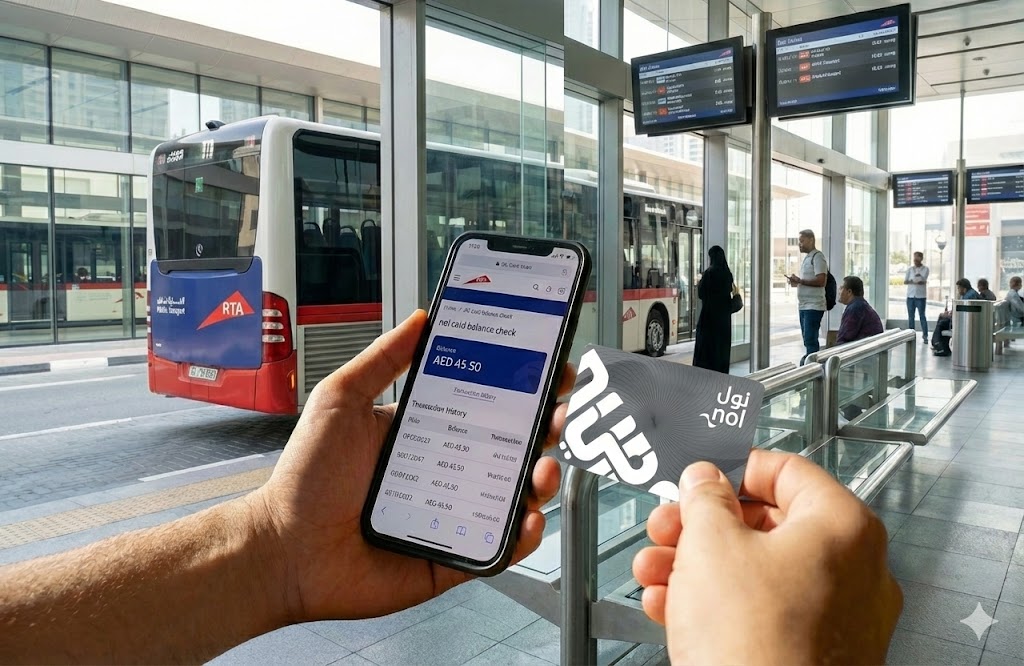
🪪 Instant Nol Card Balance Check
Enter your 10 or 14-digit Tag ID (found on the back of your card)
Checking your Nol Card balance is essential for smooth travel across Dubai’s public transport network. Whether you’re commuting via the Dubai Metro, Bus, Tram, or Water Bus, knowing your balance prevents gate rejection and fines. In this comprehensive 2025 guide, we cover 8+ verified methods to check your balance instantly, including online portals, SMS, mobile apps, and kiosks.
⚡ Quick Summary: Top 3 Ways to Check Balance
- 📱 nol Pay App: Best for frequent travelers (NFC scanning, instant top-up, view history)
- 🌐 RTA Website: Quickest online method without login (shows balance, pending credit, expiry)
- 💬 SMS (511): Best for offline checks (Send Tag ID to 511, get instant reply)
📋 8+ Verified Ways to Check Nol Card Balance
1. RTA Website (Official)
The most reliable method to check your balance and transaction history.
- Visit the RTA Official Website.
- Click on “Check Nol Balance”.
- Enter your 10 or 14-digit Nol Tag ID.
- Click Search to view balance, pending credit, and expiry date.
❌ Cons: Requires internet
2. nol Pay App
Dedicated app for managing all your Nol cards in one place.
- Download nol Pay (iOS/Android/Huawei).
- Scan your card using NFC or enter ID.
- View balance instantly.
- Top-up directly via the app.
❌ Cons: Requires app installation
3. SMS to 511
Quickest offline method. Works on any mobile phone.
- Open your SMS app.
- Type your 10 or 14-digit Tag ID.
- Send to 511.
- Receive balance via SMS (reply with BAL for future checks).
❌ Cons: Standard SMS charges apply
4. Metro Station Kiosks
Check while you commute at any station.
- Locate a Ticket Vending Machine.
- Place your card on the reader.
- Balance appears on screen.
- Print receipt if needed.
❌ Cons: Must be at station
5. RTA Dubai App
Official RTA app with comprehensive transport services.
- Download RTA Dubai app.
- Log in with your account.
- Navigate to “My Account” or “Nol Balance”.
- View balance and transaction history.
❌ Cons: Requires registration
6. S’hail App
Integrated transport app for all UAE public transport.
- Download S’hail (iOS/Android).
- Add your Nol card.
- Check balance in the app.
- Plan journeys and view schedules.
❌ Cons: Requires app installation
7. Authorized Merchant Shops
Check at retail locations across Dubai.
- Visit an authorized Nol card merchant.
- Ask the cashier to check your balance.
- Recharge/top-up available instantly.
- Get printed receipt.
❌ Cons: Requires visiting a store
8. Bank App Integration
For Nol-linked bank cards (Emirates NBD Go4it, Mashreq Nol).
- Open your bank’s mobile app.
- Navigate to card services.
- View Nol balance with account transactions.
- Top-up from your bank account.
❌ Cons: Only for specific bank cards
💳 Understanding Your Nol Card
Dubai’s RTA offers different Nol card types to suit various traveler needs. Choosing the right card can save you money.
| Card Type | Best For | Cost | Max Balance |
|---|---|---|---|
| 🥈 Silver Card | Regular Commuters | AED 25 (AED 19 credit) | AED 1,000 |
| 🥇 Gold Card | Premium Travel (Gold Class) | AED 25 (AED 19 credit) | AED 1,000 |
| 👤 Blue Card | Students/Seniors (Personalized) | AED 70 (AED 20 credit) | AED 5,000 |
| 🎫 Red Ticket | Tourists (Single Trips) | AED 2 | 10 Trips |
📱 Virtual / Digital NOL Card
The Digital NOL Card can be added to smartphones for easy tap-and-pay travel without carrying a physical card.
- Compatible Wallets: Apple Wallet, Samsung Pay, Huawei Wallet, Google Wallet
- Setup: Download nol Pay app, add card to digital wallet
- Accepted At: Dubai Metro, buses, trams, taxis, marine transport, parking, 2,000+ retail outlets
- Benefits: No physical card needed, instant top-up, transaction tracking
🎓 Special NOL Cards (Discounted Travel)
Dubai RTA offers special discounted cards for eligible residents:
- Student Card (Ages 5-23): 50% discount on Metro, buses, and trams with Personalized Blue Nol Card
- Senior Citizen Card (60+): 50% discount for UAE senior citizens with Blue Nol Card
- People of Determination: Free travel on all public transport with Blue Personalized Card
🚇 Dubai Metro Timings 2025
Dubai Metro operates daily with varying schedules. Always check current timings before travel.
| Day | Opening Time | Closing Time |
|---|---|---|
| Monday – Thursday | 5:00 AM | 12:00 Midnight |
| Friday | 5:00 AM | 1:00 AM (next day) |
| Saturday | 5:00 AM | 12:00 Midnight |
| Sunday | 8:00 AM | 12:00 Midnight |
| Public Holidays | Extended hours (often until 1:00 AM) – Check RTA website for specific dates | |
Note: Both Red Line and Green Line follow the same schedule. Timings may change for maintenance or special events.
✨ Benefits of RTA NOL Card
Multi-Transport Use
Use on Metro, buses, trams, water buses, and taxis across Dubai
Cost Savings
Lower fares than single tickets, no cash handling fees
Retail Payments
Pay at 2,000+ outlets, supermarkets, restaurants, and theme parks
Fuel Stations
Fill up at ENOC and EPPCO gas stations
Healthcare Access
Use at select healthcare facilities
Trip History
Track all transactions and travel history online
🔧 Troubleshooting Common Issues
❌ Card Not Scanning at Gates
Solutions:
- Ensure card is not damaged or bent
- Remove card from wallet (other cards may interfere)
- Hold card flat against reader for 2-3 seconds
- Check if card has expired (valid for 5 years)
- Visit RTA customer service if issue persists
⚠️ Negative Balance Issues
Why it happens: If your balance drops below the minimum during a journey, you’ll have a negative balance.
Solutions:
- Top-up immediately at any kiosk or online
- You can still exit the station with negative balance
- Must clear negative balance before next journey
- Always maintain minimum AED 7.50 for Metro travel
🔄 Balance Not Updating After Top-Up
Solutions:
- Wait 5-10 minutes for system to update
- Tap card at any Metro gate or parking meter to activate credit
- Check “pending credit” on RTA website
- Contact RTA if balance doesn’t update within 24 hours
🚨 Lost or Stolen Card
For Registered Blue Cards:
- Report immediately via RTA app or website
- Card will be blocked to protect balance
- Balance can be transferred to new card
- Visit RTA customer service center with Emirates ID
For Unregistered Silver/Gold Cards:
- Cannot be blocked or refunded
- Purchase new card immediately
- Consider registering new card for protection
❓ Frequently Asked Questions (FAQs)
What is the minimum balance required for Metro?
You need a minimum balance of AED 7.50 to start a journey on the Dubai Metro. Ensure you top up if your balance is below this amount to avoid gate rejection.
Can I transfer balance from one Nol card to another?
No, balance transfer between standard Nol cards is not currently supported. However, if you have a registered Blue card that is lost or stolen, you can recover the balance to a new card.
How long is my Nol card valid?
Silver and Gold Nol cards are valid for 5 years from the date of issue. Red tickets are valid for 90 days or 10 trips, whichever comes first. You can check your card’s expiry date on the RTA website.
What should I do if my card is lost?
If you have a registered Blue Nol card, report it immediately via the RTA app or website to block it and protect your balance. Unregistered Silver/Gold cards cannot be blocked or refunded.
How do I check if my NOL card is valid or expired?
Visit the RTA website, enter your Tag ID, and check the expiry date displayed. You can also check at metro station kiosks or through the nol Pay app.
Can I recharge my NOL card online?
Yes! You can recharge online via the RTA website, nol Pay app, RTA Dubai app, or through bank apps for linked Nol cards (Emirates NBD Go4it, Mashreq Nol).
Where can I buy a NOL card in Dubai?
NOL cards are available at all Metro stations, bus stations, RTA customer service centers, and authorized retailers across Dubai including supermarkets and convenience stores.
What is the NOL HOW portal?
The NOL HOW Portal is RTA’s official guide providing complete information on how to purchase, renew, top-up, and manage your NOL card.
Can I use my NOL card in Abu Dhabi?
No, Dubai’s NOL card works only in Dubai. Abu Dhabi uses the Hafilat card for public transport. However, some intercity buses may accept both systems.
How do I register my NOL card?
Only Blue Nol cards can be registered. Visit an RTA customer service center with your Emirates ID, passport photo, and the card. Registration protects your balance if the card is lost or stolen.
What happens if my balance goes negative?
You can complete your current journey and exit the station, but you must top-up to clear the negative balance before your next trip. The system will not allow entry with a negative balance.
Can I get a refund on my NOL card balance?
Yes, for registered Blue cards only. Visit an RTA customer service center to request a refund. Silver and Gold cards are non-refundable, but you can use the balance until the card expires.
Is there a NOL card app for iPhone?
Yes! Download the nol Pay app from the Apple App Store. You can also add your NOL card to Apple Wallet for contactless payments.
How do I add my NOL card to Apple Wallet?
Download the nol Pay app, register your card, then follow the prompts to add it to Apple Wallet. You can then use your iPhone or Apple Watch to tap and pay for transport.
Can I use multiple NOL cards on one account?
Yes, the nol Pay app allows you to manage multiple NOL cards under one account. You can switch between cards and check balances for all of them.
📞 RTA Customer Service
Need Help? Contact RTA 24/7
Office Hours
Mon-Thu: 7:30 AM – 3:30 PM
Friday: 8:00 AM – 12:30 PM
Email Support
General inquiries and support
Response within 24-48 hours
Follow RTA on Social Media
✅ Final Tips for NOL Card Users
- Always maintain a minimum balance of AED 7.50 to avoid gate rejection
- Register your Blue card to protect your balance if lost or stolen
- Set up auto-recharge in the nol Pay app for convenience
- Check your balance regularly to avoid negative balance situations
- Keep your card away from magnets and avoid bending to prevent damage
- Consider adding your NOL card to Apple/Samsung Wallet for digital convenience